 Clausery
Free change order form template (Word)
A change order that records a change to a signed contract: the original contract and project, what is being added, removed or changed, the price increase or decrease and new total, any new completion date, and both signatures before work starts.
Does the maths for you: fill it in online and the price change and new contract price are calculated as you type.
No sign-up. Your answers stay in your browser. Who it is for: Contractors, freelancers, agencies and their clients who need to agree extra work or a change in scope without rewriting the contract.
Updated · Word (.docx) · Free to use and adapt
Need more than one? Download all 87 templates as one .zip file.
What is in the change order form
- Change order number, date and project
- The original contract and parties
- Description of the change
- List of change items with amounts
- Price increase or decrease and new total
- Optional payment terms for the change
- Schedule change and new completion date
- Everything else unchanged; signatures before work starts
Read the full template
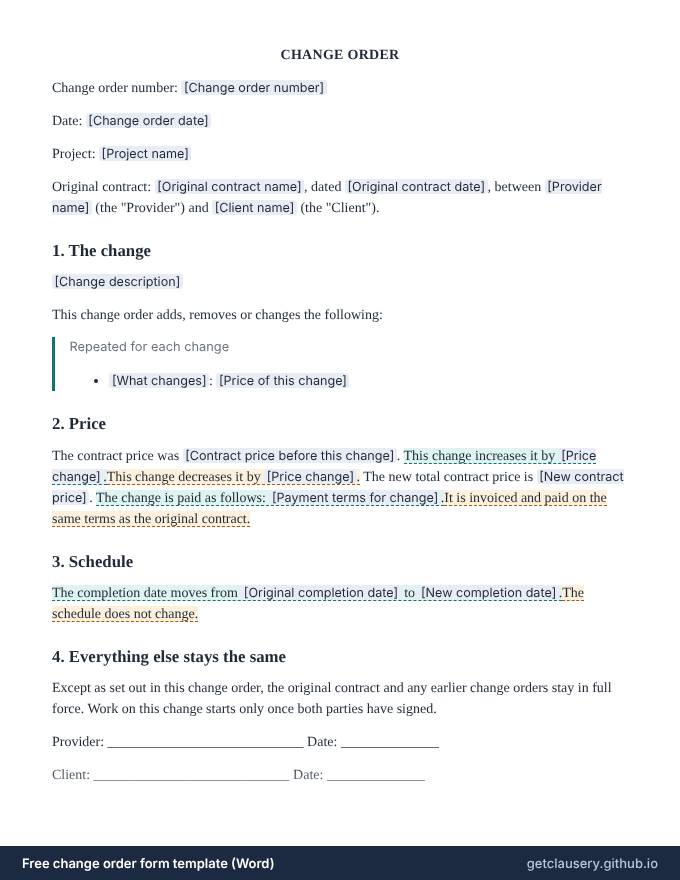
This is the complete wording. [Labels] are filled in from your answers, and highlighted text only appears when it applies; hover over it to see when.
CHANGE ORDER
Change order number: [Change order number]
Date: [Change order date]
Project: [Project name]
Original contract: [Original contract name], dated [Original contract date], between [Provider name] (the "Provider") and [Client name] (the "Client").
1. The change
[Change description]
This change order adds, removes or changes the following:
Repeated for each change
- [What changes]: [Price of this change]
2. Price
The contract price was [Contract price before this change]. This change increases it by [Price change].This change decreases it by [Price change]. The new total contract price is [New contract price]. The change is paid as follows: [Payment terms for change].It is invoiced and paid on the same terms as the original contract.
3. Schedule
The completion date moves from [Original completion date] to [New completion date].The schedule does not change.
4. Everything else stays the same
Except as set out in this change order, the original contract and any earlier change orders stay in full force. Work on this change starts only once both parties have signed.
Provider: ____________________________ Date: ______________
Client: ____________________________ Date: ______________
The questions you answer
Clausery turns the template into a short questionnaire. Optional parts only appear when they apply, and anything marked Calculated for you is worked out from your other answers.
| Question | Type | Asked when |
|---|---|---|
| Change order number | Short text | Always |
| Change order date | Date | Always |
| Project name | Short text | Always |
| Original contract name | Short text | Always |
| Original contract date | Date | Always |
| Provider name | Short text | Always |
| Client name | Short text | Always |
| Change description | Long text | Always |
| Change items For each item: What changes, Price of this change | Repeating group | Always |
| The price goes up (untick if it goes down) | Yes / no | Always |
| Price change | Calculated for you | Always |
| Contract price before this change | Money | Always |
| New contract price | Calculated for you | Always |
| The change is paid differently from the contract | Yes / no | Always |
| Payment terms for change | Long text | If “The change is paid differently from the contract” is yes |
| The completion date changes | Yes / no | Always |
| Original completion date | Date | If “The completion date changes” is yes |
| New completion date | Date | If “The completion date changes” is yes |
How to use it
Open it
Click Fill it in now. The template opens in Clausery with its questionnaire ready.
Answer the questions
Work through the sections. Drafts save as you type, on your device.
Download the document
Get a finished Word file with your formatting intact, or print it to PDF.
Prefer to start from your own wording? Download the Word file, edit it, keep the {tags}, and upload it to Clausery. See the template syntax.
Questions
What is a change order?
A short signed document that changes the scope, price or schedule of an existing contract, so both sides agree the extra work and its cost before it is done.
When should I use a change order?
Whenever the client asks for something outside the agreed scope, or the work changes enough to affect the price or deadline. Agreeing it first avoids disputes at invoice time.
Does a change order replace the contract?
No. It changes only what it says; the rest of the original contract and earlier change orders stay in force.
Is it really free?
Yes. The download is free, and filling it in with the Clausery app is free too, with unlimited documents. Library templates never count towards a plan limit, and no account or card is needed.
Is my information uploaded anywhere?
No. Clausery runs entirely in your browser. Your answers and the finished document are created and stored on your own device.
Is this legal advice?
No. These are general samples. Laws differ between countries and states, so have the wording reviewed for your situation before you rely on it.
Guide: What is a change order? How to handle scope changes
Free tool: Deadline calculator: a new completion date a set number of days away
Related templates
All 87 free templates
Business agreements
- Independent contractor agreement
- Statement of work
- Consulting agreement
- Service agreement
- Subcontractor agreement
- Memorandum of understanding (MOU)
- Letter of intent (business purchase)
- Partnership agreement
- Sales commission agreement
- Price quote
- Purchase order
- Equipment rental agreement
- Meeting minutes
- Board resolution
- Consignment agreement
Freelance contracts
- Web design contract
- Graphic design contract
- Photography contract
- Social media management contract
- Freelance writing contract
- Video production contract
- Virtual assistant agreement
- Event planning contract
- Personal training agreement
- Tutoring agreement
- Retainer agreement
- Photo and model release
- Cleaning services contract
- Nanny contract
- Catering contract
- Pet sitting agreement
- Coaching agreement
Loans and getting paid
Landlords and tenants
- Rental application
- Rent receipt
- Lease renewal letter
- Pet addendum
- Residential lease agreement
- Sublease agreement
- Move-in and move-out checklist
- Late rent notice
- Notice to vacate (tenant)
- Rent increase letter
- Security deposit return letter
- Roommate agreement
- Lease termination agreement
- Room rental agreement
- Rent payment plan agreement
- Landlord reference letter
NDAs, letters and sales
HR letters
- Employment agreement
- Employee warning letter
- Promotion letter
- Offer letter
- Employment verification letter
- Termination letter
- Reference letter
- Salary increase letter
- Internship offer letter
- Resignation letter
- Two weeks notice letter
- Severance agreement
- Job description
- Performance improvement plan
- Remote work agreement
This template is a general sample and not legal advice. Laws vary by jurisdiction; have it reviewed before use.