 Clausery
Free invoice template for Word, with VAT and bank details
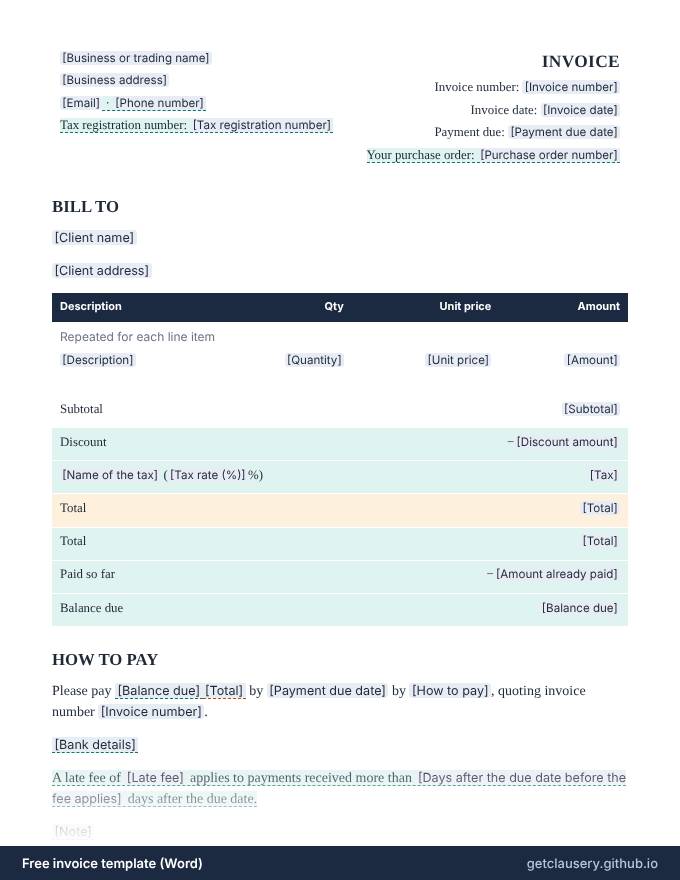
An invoice with your business details and tax number, an invoice number and due date, the client's purchase order number, a list of items with quantity, rate and amount, an optional discount and tax, any amount already paid, and how to pay.
Does the maths for you: fill it in online and the line amounts, subtotal, tax, total and balance due are calculated as you type.
No sign-up. Your answers stay in your browser. Who it is for: Freelancers, consultants, tradespeople and small businesses who bill clients and want a clean, consistent invoice without accounting software.
Updated · Word (.docx) · Free to use and adapt
Need more than one? Download all 87 templates as one .zip file.
What is in the invoice
- Your business name, address, email and phone
- Optional tax registration number
- Invoice number, invoice date and due date
- The client's purchase order number
- Line items: what you supplied, quantity, rate and amount
- Subtotal, optional discount and tax
- Amount already paid and the balance due
- How to pay, with optional bank details
- Optional late fee and notes
Read the full template
This is the complete wording. [Labels] are filled in from your answers, and highlighted text only appears when it applies; hover over it to see when.
[Business or trading name] [Business address] [Email] · [Phone number] Tax registration number: [Tax registration number] | INVOICE Invoice number: [Invoice number] Invoice date: [Invoice date] Payment due: [Payment due date] Your purchase order: [Purchase order number] |
BILL TO
[Client name]
[Client address]
Description | Qty | Unit price | Amount |
|---|---|---|---|
| Repeated for each line item | |||
[Description] | [Quantity] | [Unit price] | [Amount] |
Subtotal | [Subtotal] |
Discount | −[Discount amount] |
[Name of the tax] ([Tax rate (%)]%) | [Tax] |
Total | [Total] |
Total | [Total] |
Paid so far | −[Amount already paid] |
Balance due | [Balance due] |
HOW TO PAY
Please pay [Balance due][Total] by [Payment due date] by [How to pay], quoting invoice number [Invoice number].
[Bank details]
A late fee of [Late fee] applies to payments received more than [Days after the due date before the fee applies] days after the due date.
[Note]
Thank you for your business.
The questions you answer
Clausery turns the template into a short questionnaire. Optional parts only appear when they apply, and anything marked Calculated for you is worked out from your other answers.
| Question | Type | Asked when |
|---|---|---|
| Business or trading name | Short text | Always |
| Business address | Long text | Always |
| Always | ||
| Show a phone number | Yes / no | Always |
| Phone number | Phone | If “Show a phone number” is yes |
| Show a tax registration number | Yes / no | Always |
| Tax registration number | Short text | If “Show a tax registration number” is yes |
| Invoice number | Short text | Always |
| Invoice date | Date | Always |
| Payment due date | Date | Always |
| The client gave a purchase order number | Yes / no | Always |
| Purchase order number | Short text | If “The client gave a purchase order number” is yes |
| Client name | Short text | Always |
| Client address | Long text | Always |
| Line items For each item: Description, Quantity, Unit price, Amount | Repeating group | Always |
| Subtotal | Calculated for you | Always |
| Give a discount | Yes / no | Always |
| Discount amount | Money | If “Give a discount” is yes |
| Charge sales tax or VAT | Yes / no | Always |
| Name of the tax | Short text | If “Charge sales tax or VAT” is yes |
| Tax rate (%) | Number | If “Charge sales tax or VAT” is yes |
| Tax | Calculated for you | If “Charge sales tax or VAT” is yes |
| Total | Calculated for you | Always |
| The client has already paid part of it | Yes / no | Always |
| Amount already paid | Money | If “The client has already paid part of it” is yes |
| Balance due | Calculated for you | If “The client has already paid part of it” is yes |
| How to pay | Short text | Always |
| Add bank details | Yes / no | Always |
| Bank details | Long text | If “Add bank details” is yes |
| Charge a late fee | Yes / no | Always |
| Late fee | Money | If “Charge a late fee” is yes |
| Days after the due date before the fee applies | Number | If “Charge a late fee” is yes |
| Add a note | Yes / no | Always |
| Note | Long text | If “Add a note” is yes |
How to use it
Open it
Click Fill it in now. The template opens in Clausery with its questionnaire ready.
Answer the questions
Work through the sections. Drafts save as you type, on your device.
Download the document
Get a finished Word file with your formatting intact, or print it to PDF.
Prefer to start from your own wording? Download the Word file, edit it, keep the {tags}, and upload it to Clausery. See the template syntax.
Questions
What must an invoice include?
At least your business name and contact details, the client's name, a unique invoice number, the invoice date, what you supplied with the amounts, the total due, and when and how to pay. If you are registered for VAT, GST or sales tax, the tax authority adds requirements, such as your registration number and the tax charged.
How should I number my invoices?
Give every invoice a unique number in a sequence you never reuse, such as 2026-001, 2026-002. Sequential numbers make invoices easy to track, and some tax systems require them; EU VAT rules, for example, require a sequential number that identifies each invoice.
Does the template add up the totals?
You type the line amounts and totals, and they are printed exactly as entered, so check them with a calculator or spreadsheet. On the Pro plan you can make them computed fields that add themselves up.
Is it really free?
Yes. The download is free, and filling it in with the Clausery app is free too, with unlimited documents. Library templates never count towards a plan limit, and no account or card is needed.
Is my information uploaded anywhere?
No. Clausery runs entirely in your browser. Your answers and the finished document are created and stored on your own device.
Is this legal advice?
No. These are general samples. Laws differ between countries and states, so have the wording reviewed for your situation before you rely on it.
Clauses in this template, explained
Guide: How to write an invoice: what to include and how to number it
Free tool: Invoice due date calculator: net 30, EOM and early payment discounts
Related templates
All 87 free templates
Business agreements
- Independent contractor agreement
- Statement of work
- Consulting agreement
- Service agreement
- Subcontractor agreement
- Memorandum of understanding (MOU)
- Letter of intent (business purchase)
- Partnership agreement
- Sales commission agreement
- Price quote
- Purchase order
- Equipment rental agreement
- Meeting minutes
- Board resolution
- Consignment agreement
Freelance contracts
- Web design contract
- Graphic design contract
- Photography contract
- Social media management contract
- Freelance writing contract
- Video production contract
- Virtual assistant agreement
- Event planning contract
- Personal training agreement
- Tutoring agreement
- Retainer agreement
- Photo and model release
- Cleaning services contract
- Nanny contract
- Catering contract
- Change order form
- Pet sitting agreement
- Coaching agreement
Loans and getting paid
Landlords and tenants
- Rental application
- Rent receipt
- Lease renewal letter
- Pet addendum
- Residential lease agreement
- Sublease agreement
- Move-in and move-out checklist
- Late rent notice
- Notice to vacate (tenant)
- Rent increase letter
- Security deposit return letter
- Roommate agreement
- Lease termination agreement
- Room rental agreement
- Rent payment plan agreement
- Landlord reference letter
NDAs, letters and sales
HR letters
- Employment agreement
- Employee warning letter
- Promotion letter
- Offer letter
- Employment verification letter
- Termination letter
- Reference letter
- Salary increase letter
- Internship offer letter
- Resignation letter
- Two weeks notice letter
- Severance agreement
- Job description
- Performance improvement plan
- Remote work agreement
This template is a general sample and not legal advice. Laws vary by jurisdiction; have it reviewed before use.